
Introducing issy: AI-native Issue Tracking
Local-first CLI and web UI that stores issues as markdown in your repo. Your AI assistant manages them directly.
Issue trackers weren't made for AI-native workflows. So I made one that is.
Issy is a simple, local, open-source system for AI-native issue tracking. You tell your coding assistant what to track, and it handles the rest. Issues are stored as markdown files in .issy/ in your repo: portable, diffable, and committed with your code. No accounts, no databases, no vendor lock-in.
Install the skill
The key piece that ties it together is the AI skill; a set of instructions your coding assistant installs that teaches it exactly how issy works, what commands to use, and how to structure issues correctly. One command:
issy skill install
That's it. Your assistant can now:
- Create issues from natural language descriptions
- Search by status, priority, or keyword
- Update issue details and status
- Close issues when work is done
- List open issues across your project
- Manage your roadmap; order issues by dependency, surface the next one to work on
No prompting, no explaining the format each time.
Why not GitHub Issues or Linear?
I've been building ClawBase.ai and wanted issue tracking that felt native to my AI-augmented workflow.
Sure, AI assistants can access GitHub Issues or Linear via MCP servers or CLIs. But that requires setup; API keys, authentication, configuring the right tool. And those issues still live outside your codebase.
With issy, issues are just markdown files in your repo. No setup. No API keys. No network dependency. They travel with your code, appear in diffs and PRs, and work offline. Your AI assistant can read and write them as easily as any other file in your project.
How I actually use it
I use voice-to-text a lot. Instead of carefully typing out a structured issue, I just ramble at my AI assistant:
"so there's this bug where when you log in with google oauth it redirects you back to the callback page but the session isn't being set up properly so users just get stuck in this weird redirect loop, it's happening on prod, pretty high priority, open an issue"
The assistant parses my stream-of-consciousness and creates a properly formatted issue:
---
title: Google OAuth redirect loop on login
description: Users get stuck in redirect loop after OAuth callback
type: bug
priority: high
scope: medium
status: open
order: a0
labels: auth, prod
---

## Problem

After authenticating with Google OAuth, users are redirected back to the
callback page but the session isn't being set up properly. This causes a
redirect loop where users get stuck and can't access the app.

Currently happening on prod.

## Verification

1. Log in with Google OAuth
2. Confirm redirect completes and session is established
3. User should land on dashboard, not loop back to callback
I don't have to context-switch into "issue writing mode"; I just describe the problem naturally and keep moving.
Closing issues is just as easy:
"can you close that auth redirect bug from earlier, I just pushed a fix for it"
What to work on next
Every open issue has a position in the roadmap; a strict order that reflects what should be done when. When creating an issue, you specify where it fits:
"open a high-priority bug for the payment webhook timeout; put it before the onboarding redesign"
The assistant slots it into the right position. issy next always returns the single next thing to work on. No triaging, no scanning a backlog; just "what should I work on next?"
There's also an on-close hook: drop an on_close.md in your .issy/ directory, and its contents get printed to stdout every time an issue is closed. Since AI agents read command output, it's a clean way to inject post-close reminders like "check if this unblocks any downstream issues."
The web UI
issy also ships with a local web UI for browsing and editing issues visually. Just run:
issy
It finds your .issy directory and spins up at http://localhost:1554.
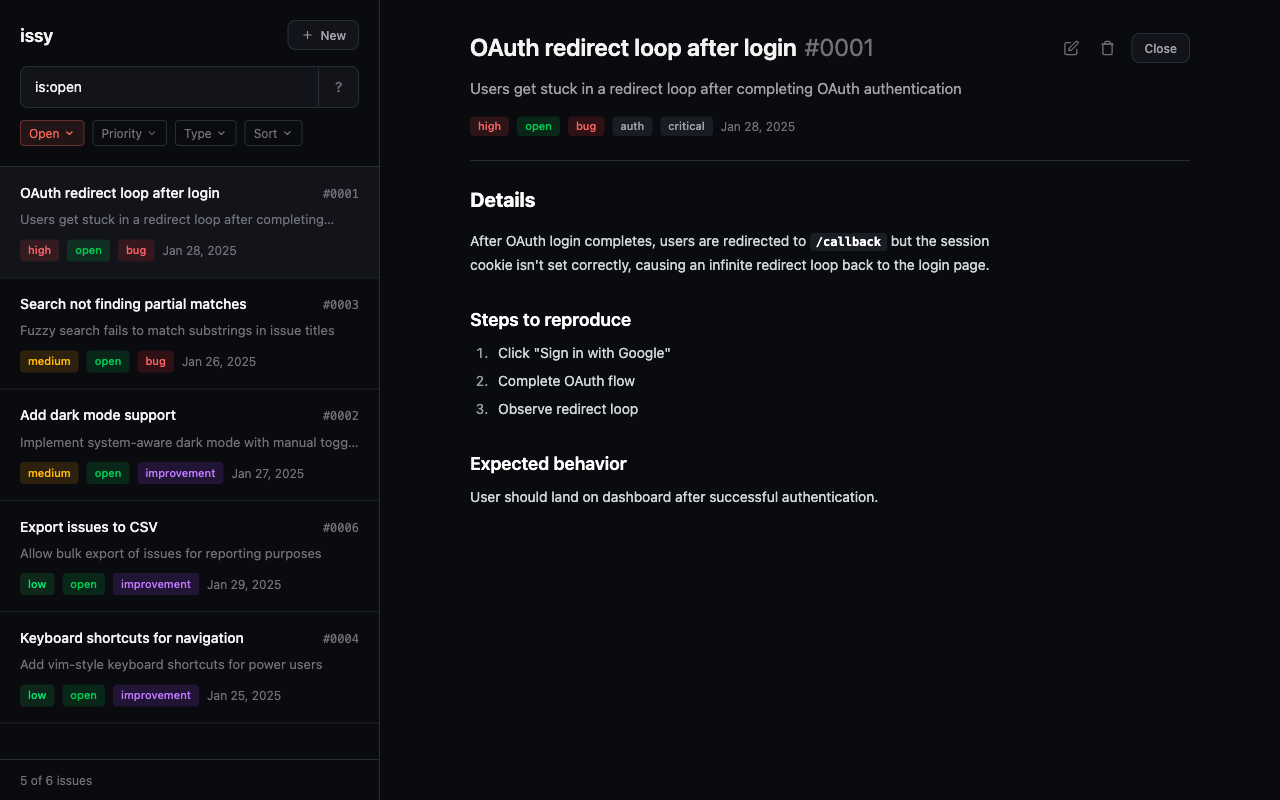
It ships as three packages on npm: a CLI for quick terminal commands, a core library that handles storage, parsing, and fuzzy search, and the web UI above.
The deeper idea
The future of developer tooling is AI-native; tools designed from the ground up to be operated by both humans and AI agents.
Most existing tools were built for humans to click around in. They have GUIs, dashboards, and authentication flows that add friction for AI agents. issy takes the opposite approach: a tool that's equally usable by you and your AI assistant. Just markdown files that live in your repo.
I built it for my own workflow first, and it's been the issue tracker for ClawBase since day one. Your issues should live where your code does.